









// Recruitment Strategies
Post-Holiday Guide for Managing Recruitment Emails
19/01/2026
9 MIN
Managing email workload after the holidays, especially if you’ve been out of the office for several days, can be overwhelming and stressful. Work doesn’t always stop when the office closes, so you may continue receiving recruitment emails from potential candidates applying to a new job opening, messages on social media, and questions from clients.
Apart from the many recruitment emails, you’ll also need to manage interview scheduling, keep new tasks organized, and prioritize your workload by creating lists, whether in Excel, Outlook, or another organizational tool.
At the same time, you may start setting your goals for the new year. If you’re a bit of a romantic, you’ll want a clear vision and something to look forward to. That might mean expanding your network, starting a new creative project, setting a specific hiring target, or reaching a defined ARR goal.
This guide will help you get back on track, manage your workload efficiently, and stay as organized as possible, so you can achieve better results and remain fully engaged with both clients and candidates, without letting recruitment emails slow you down.
Recruiter’s Biggest Challenges After the Holidays
Recruiting comes with many challenges, especially when it comes to administrative work. Managing a high volume of emails, particularly recruitment emails, tracking details for each candidate, and keeping everything organized can quickly become overwhelming.
This becomes even more difficult during the holidays, when offices may be closed but messages continue to arrive, causing the volume of emails and new information to grow with each passing day.
Below, you’ll find some of the most common challenges:
Prioritization
On top of everything else, you’ll likely be managing multiple roles at once, each at a different stage of the hiring process. Some candidates may still be in the early screening phases, while others are already at the offer stage, which makes organization and prioritization essential, especially when juggling urgent recruitment emails and scanning each subject line for what needs attention first.
To stay on track, you’ll need to clearly identify which roles and candidates require immediate attention and focus first on those with the highest priority.
Follow-Up Scheduling
You also need to remember when to send follow-ups, especially when managing a high volume of candidates and running campaigns with multiple steps. Using effective recruiting email templates can make this process more efficient, particularly when sourcing candidates from multiple job boards and coordinating outreach at scale.
It can also be difficult to remember who needs a follow-up email and with whom you need to schedule a meeting, especially when several days have passed and you’re managing multiple candidates at once.
Setting reminders, whether through your calendar, Outlook, or another tool, such as for an interview invitation email, helps ensure you send timely messages or emails every two to three days and keep candidates engaged.
Inbox Overload
Some emails received during the holidays may get lost in a crowded inbox, particularly important recruitment emails,so you need to be extra careful not to miss important information, whether it’s a candidate’s details, a client’s response, or a positive reply to your outreach.
If there are specific replies you need to track after the holidays, using Ctrl + F can help, but it’s far from efficient, especially in 2026, when better tools and systems should be doing that work for you.
Features that Can Help You Manage Recruiting Workload
Despite the many challenges recruiters and agencies face, there are tools designed to support every stage of the recruitment process. When used correctly, these tools can significantly increase efficiency while reducing stress and help you keep candidates informed.
As you know, the Atlas recruitment platform is an end-to-end solution built for the AI era, designed to automate administrative tasks so you can focus on what truly matters. It brings a wide range of features together in one single platform, eliminating the need to switch between multiple systems and manually track recruitment emails.
This allows you to manage heavy workloads more efficiently and streamline your recruiting efforts.
1) Task Agent
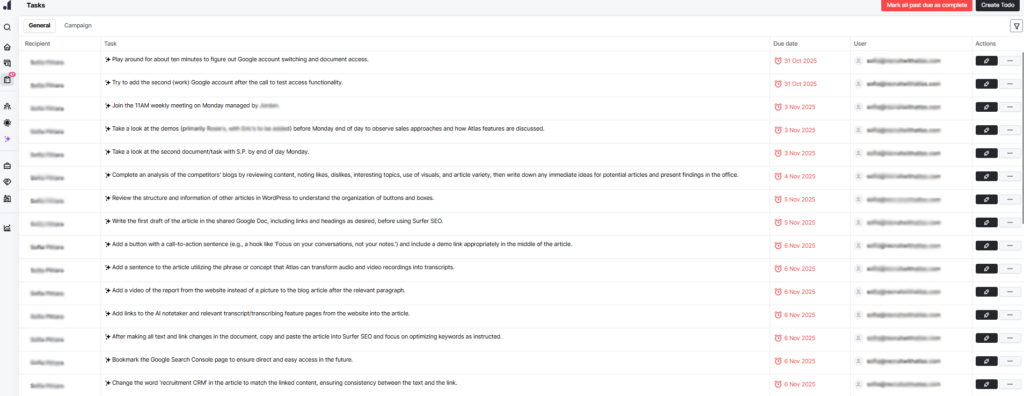
Instead of relying on multiple tools for different tasks, the Task Agent is fully integrated into the Atlas platform and helps you create and prioritize your task list in one place, even when tasks originate from meetings or recruitment emails. To get started, you simply add the AI agent to every meeting.
After each call, whether it’s a client discussion or a candidate interview, the platform identifies the tasks mentioned during the conversation and automatically generates a task list for you.
This allows you to stay organized while easily tracking your progress. From there, you can set priorities, focus on your top candidates, and ensure nothing critical is missed. You can mark tasks as completed, see how many remain, and quickly identify which ones require immediate attention, such as scheduling online or in-person interviews, following up with key stakeholders, or moving candidates to the next stage.
2) Outreach Campaigns & Email Templates
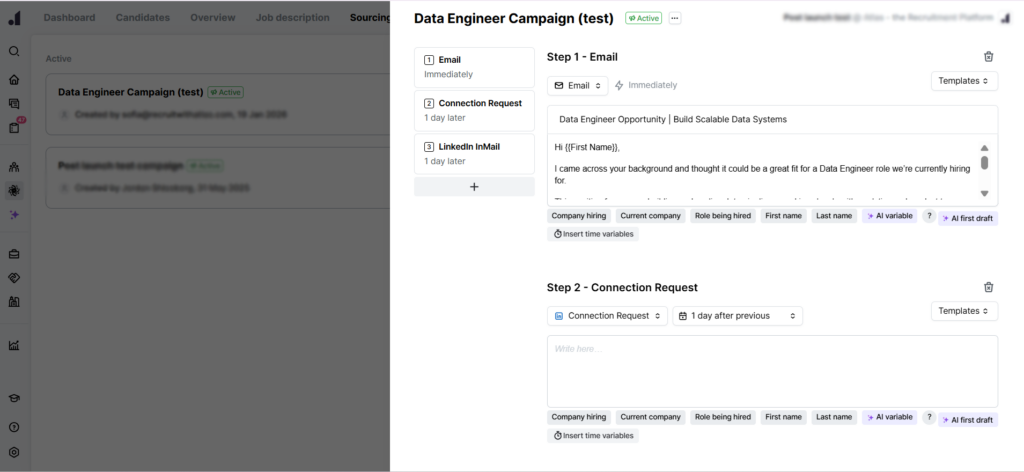
One of the first things a recruiter can do is create an outreach campaign, helping structure and scale recruitment emails. This allows you to build a personalized campaign with as many steps as needed, using different actions such as connection requests, messages, or emails across multiple channels, including social media and email. By leveraging recruiting email templates, you can maintain consistency and quality across every touchpoint.
You can schedule when each message is sent and define the number of days between follow-ups. With everything automated, you don’t have to rely on memory. The system automatically creates a follow-up email list and keeps all activity organized in one place, including campaigns built with cold recruiting email templates designed for first-touch outreach.
In addition, the AI-powered feature can generate fully personalized emails for you, automatically creating a compelling subject line, job title references, and key details from the job description based on the role and candidate profile. This ensures each message feels tailored and relevant without requiring manual input for every outreach.
You can clearly see how many candidates you’ve sourced, which channels you’ve used, and how many responses you’ve received, both positive and negative. When it’s time to send reminders, messages are sent only to candidates who haven’t replied, saving time and ensuring no one is overlooked.
3) Meeting Scheduling
Based on experience, one of the easiest ways to manage interviews is to create a calendar link and share it with candidates after the initial contact, reducing back-and-forth recruitment emails and the need for repeated interview confirmation emails. This allows you to block the time slots you choose and automatically track which candidates have booked a call, and make meeting scheduling easier.
With the Atlas calendar link, you can create separate meeting links for each role, making it easy to see how many interviews are scheduled per position and how many are still needed across the interview process.
You can also define meeting details such as duration, availability window (from when the link is active until it expires), and interview length, whether 30 minutes or one hour. In addition, you can schedule breaks between interviews to better manage your time.
4) Storing Recruiting Emails
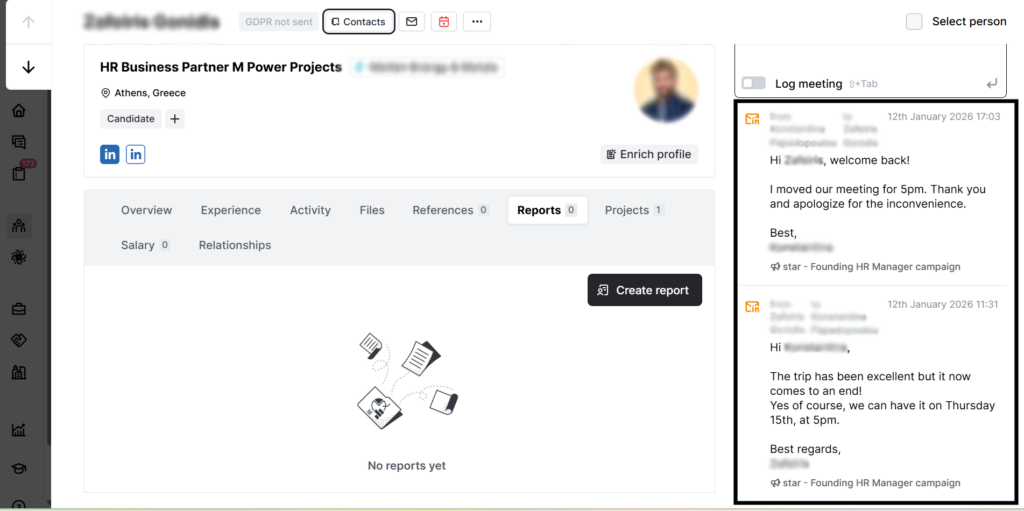
When dealing with the challenge of receiving hundreds of messages or recruitment emails every day, it’s easy for important ones to get lost. This tool helps you stay organized and ensures that no critical message is overlooked, storing all your inbox emails within the platform.
When you send or receive a message or recruitment email from a candidate or client who is already in your database, the system automatically stores the conversation in their profile. This means every interaction and detail is available in one place, helping you stay on top of ongoing relationships and keep track of passive candidates for future opportunities without taking immediate action.
It reduces the risk of missing important updates, such as an offer or a rejection, and ensures clear, consistent communication with both clients and candidates.
Maintaining a Positive Candidate Experience
After the holidays, candidates are often in a similar position, catching up on emails, reassessing priorities, and deciding on their next career moves in their job search as they navigate a competitive job market. Timely, clear, and well-structured candidate communication plays a crucial role in keeping candidates engaged and avoiding drop-off. This includes referred candidates and other job seekers who may be evaluating multiple options.
By staying organized and responding consistently, recruiters can create a smoother experience that builds trust and strengthens relationships, even during high-volume periods. This helps ensure candidates remain engaged, whether they’re actively considering a current job opportunity or open to future opportunities. It also reduces the risk of a poor candidate experience caused by delays or unclear messaging.
Tracking response rates, follow-up success, and channel performance helps recruiters refine their outreach strategy and focus on the most effective approaches to attract and retain qualified candidates by aligning roles more closely with each candidate’s skills and expectations.
It’s also important to remember that a quick chat with a potential employee for a job role can lead to future sales opportunities. A positive candidate experience can generate more referrals, and in many cases, today’s candidate can become tomorrow’s client.
Start the Year with the Right Applicant Tracking System
The beginning of the year is the perfect time to rethink how you manage your recruitment workflow and remove unnecessary friction, including the way you handle recruitment emails for each job opening. By centralizing your work in one platform, you create a single source of truth for all your recruitment activity and your candidate database, ensuring visibility across all the candidates you engage with and the relevant job details.
Using tools like task automation, outreach campaigns, smart scheduling, and message tracking allows you to build a more organized, efficient, and scalable hiring process.
Reducing manual tasks, improving follow-ups, and keeping recruitment emails under control not only boosts productivity but also creates a smoother experience for both candidates and clients, making a real impact on daily workload and long-term results.

Related news

// Recruitment Strategies
5 Struggles That Recruiters Are Facing and How an AI Applicant Tracking System Can Help
Discover 5 key challenges recruiters face in documentation and candidate evaluation and how AI-powered solutions can help.
12/18/2025
9 MIN

// Recruitment Strategies
6 Practical Tips to Manage Your Recruiting Pipeline During Holidays
Discover practical tips to manage your recruiting pipeline during the holidays and keep hiring on track without losing top talent.
12/16/2025
8 MIN

// Recruitment Strategies
Top 10 Applicant Tracking System (ATS) Features You Need in 2026
Explore the top ATS features that matter most in 2026. From AI automation to smart integrations, learn what makes an ATS work harder for agency recruiters.
09/03/2025
16 MIN