









// Atlas Technology
What Really Happens When Recruiting Agencies Migrate Data from Their AI CRM to Atlas?
18/02/2026
8 MIN
Changing a CRM can sound terrifying, especially when it comes to migrating years of recruitment data between different CRM platforms. Many agencies rely on detailed candidate records, client information, placement history, and other customer data to run their business. The fear of losing data, breaking workflows, or spending weeks fixing issues after the move is very real.
To help you better understand this process, Data Engineers at Atlas – the Recruitment Platform, have shared their experience working closely with recruitment agencies during CRM data migrations. They are responsible for transforming client data, ensuring data validation, maintaining data integrity, and making sure only relevant data is migrated safely from legacy CRMs into Atlas.
Based on their hands-on experience with dozens of migrations, this interview explores what really happens behind the scenes. The team shares common risks, the most frequent questions clients ask, and practical insights into how CRM migration works, explained in simple terms for anyone considering a move to Atlas – the Recruitment Platform.
They also explain how following a structured CRM data migration checklist helps reduce uncertainty and ensures nothing critical is overlooked.
What Does the CRM Data Migration Process Look Like from Start to Finish?
The CRM data migration process starts with receiving the client’s data from their previous system. This data can come in different formats, such as CSV files or a full database data backup.
Once the data is received, it is mounted and accessed to ensure proper data accessibility, allowing the migration team to work with it efficiently.
The next step is checking the migration mapping, which means making sure that all entities, such as candidates, companies, jobs, and pipeline stages, can be correctly matched to Atlas. This step is critical to avoid missing data, especially when client workflows differ from Atlas’s standard structure.
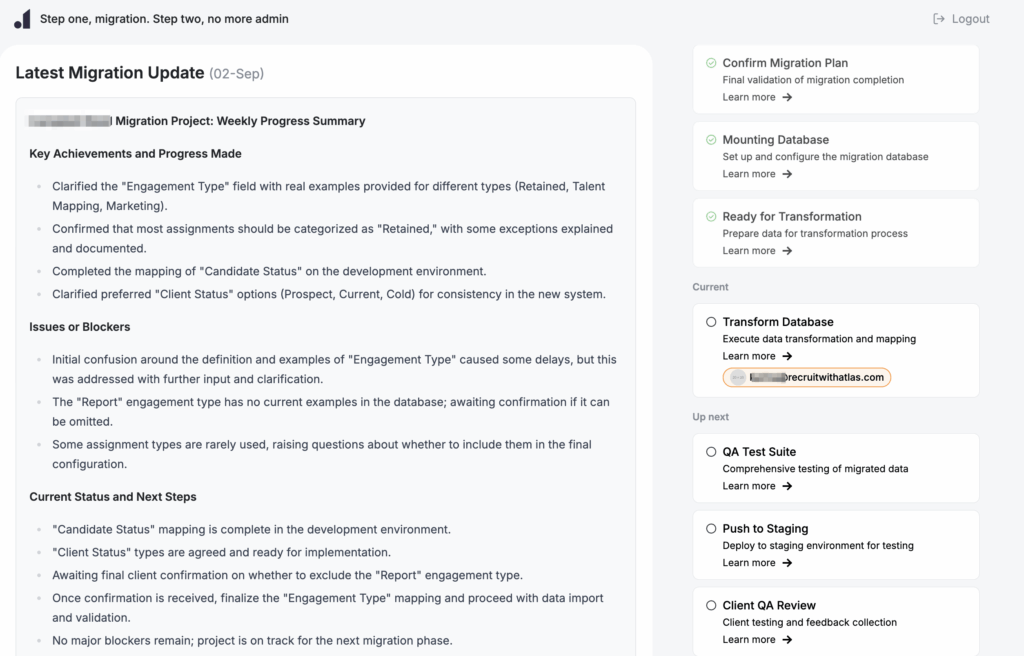
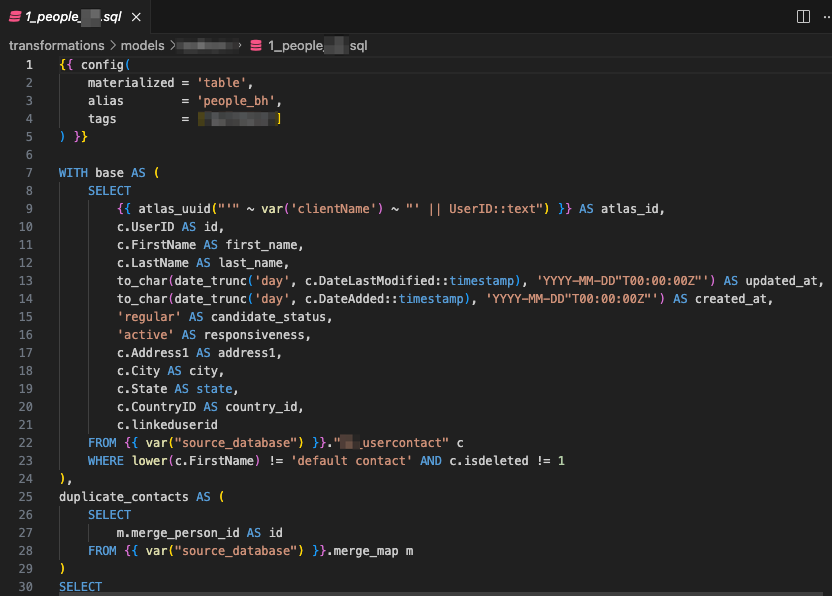
After the mapping is confirmed, the data is transformed to fit Atlas’s requirements. Every field and column is carefully checked to ensure it follows the correct format and naming conventions before the data import begins.
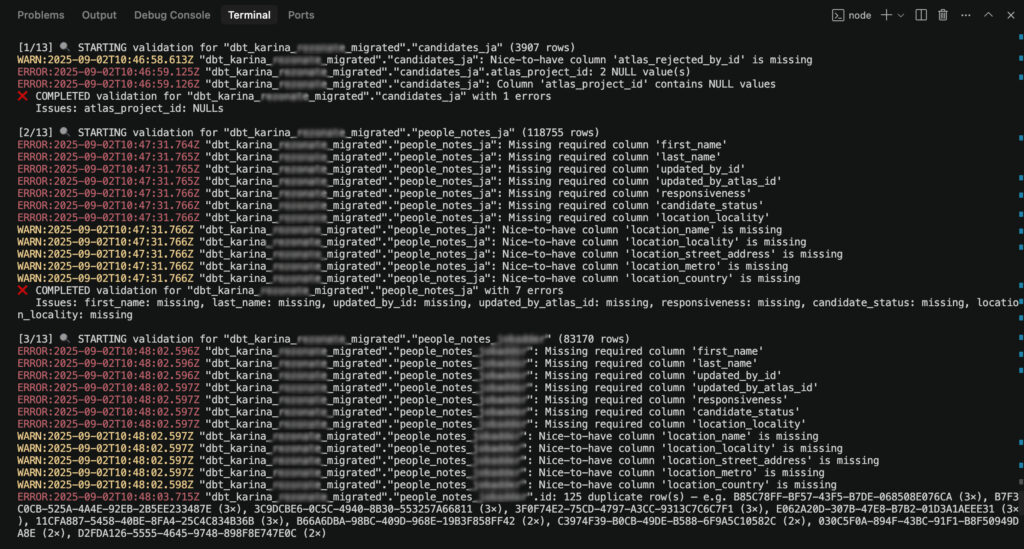
A quality assurance check is then run using automated tools to catch any issues before loading the data. The data is first migrated to a staging environment, which mirrors the live Atlas platform. Clients review their data in staging and provide feedback.
Once the data is approved, it is migrated to the production environment, including profiles, CVs, and files. The migration is completed only after the client confirms that the data is accurate.
What Are the Main Challenges During CRM Data Migration?
While every CRM migration project is different, a few common challenges can arise during the process, especially when working with complex or long-standing recruitment data.
Differences Between Expectations and Existing Data
During migration, it can become clear that some data is incomplete or structured differently than expected, which may require additional clarification or decisions.
Missing or Unclear Data Relationships
The migration team maps the relationships between entities, such as projects with candidate statuses, to ensure all data connections are accurate and aligned with clients’ workflow.
Required Fields Not Fully Completed
Some records may be missing mandatory information, such as titles, statuses, or start dates, which the new system requires to process data correctly. When these fields are incomplete, records may not load successfully during migration, even though they are expected to appear in the new system.
For example, the candidate experience field cannot be added without a start date. Atlas – the Recruitment Platform calculates the total number of years a candidate has worked, and without a start date, the system cannot generate this calculation.
Complexity of Custom Fields
Custom attributes, such as specific tags or search fields used to filter candidates by criteria like skills or gender, vary widely between CRMs. As a result, they often require careful review to ensure they are mapped accurately during the migration process.
Older or Highly Customised Systems
Legacy or custom-built platforms can have more complex data structures, which may take longer to analyse and transform.
Time Needed for Client Review
The migration process relies on client feedback during the staging phase, and delays can occur if reviews take longer than expected.
How to Reduce Risks During CRM Data Migration
To reduce risks and keep the migration process smooth, the migration team follows a structured and proactive approach at every stage of the migration. Much of their work focuses on prevention, clarity, and early validation. Below are some key steps that the team follows to ensure a successful migration.
1) Planning Clear Data Mapping Before Migration Starts
They review how client data is structured and map it to Atlas – the Recruitment Platform early in the process. This helps identify gaps, missing fields, or mismatched statuses before any data is loaded.
2) Using Staging for Early Validation
All data is first migrated to a staging environment that mirrors the live platform. This allows issues to be identified and resolved without impacting production data, as making changes after the data is in production is significantly more costly and disruptive. Clients are encouraged to review their data in staging and confirm accuracy before production migration, reducing the risk of surprises later.
3) Running Automated Quality Checks
Atlas – the Recruitment Platform uses automated QA tools to ensure data meets system requirements, such as correct field names, formats, and mandatory values. While Atlas uses automation and AI to support the migration process, the team needs to make sure there are no duplicates or formatting issues. Those tools do not replace manual validation.
Human expertise remains critical for complex migrations, especially when dealing with custom fields and legacy systems.
4) Working in Close Collaboration with the Onboarding Team
The migration team works closely with the onboarding team to align expectations and ensure clients understand what can and cannot be migrated.
Most Frequently Asked Questions About CRM Data Migration
Below are some of the most common questions the migration team receives from recruitment agencies during the CRM data migration procedure, along with clear and practical answers.
In most cases, a CRM data migration takes between two and four weeks. The timeline depends on data quality, database size, and how quickly clients review their data in staging. Larger or more complex systems can take longer.
Data migration is a safe and well-controlled process. While there are always potential risks in any system transition, issues can arise if data in the original system is inconsistent or not properly connected. In such cases, some information may require additional validation to ensure accuracy and completeness. This largely depends on how the data was structured and maintained before migration.
If there are records that do not need to be migrated, clients should be marked as archived or deleted and communicated to the migration team in advance, and any specific requirements should be shared beforehand.
Staging allows clients to review their migrated data in a safe test environment. This step helps confirm accuracy before moving data to the live system.
Yes, AI agents and tools are available immediately after migration. Basically, AI is statistics – the more accurate and larger the volume of data you provide, the more accurate the results will be. It is based on historical interactions, notes, activities, and other data stored in the system. As soon as the button “load to production” is pushed, everything is activated and fully operational.
Data is usually provided by the previous CRM in formats such as CSV files or database backups. The exact format depends on the system the client is migrating from.
What Is the Hardest Part of the Migration Process?
The hardest part of the migration process is usually the review on staging, when clients see their data in the new system for the first time. This is the moment when expectations meet reality. Even though the data is correctly migrated, it can look different because workflows, stages, or layouts are not the same as in the previous CRM.
This stage can take time, as clients need to review their data and understand how it fits into the new system. Once this step is completed and feedback is addressed, the rest of the migration tends to move smoothly.
A Safe Transition into a New CRM System
Overall, a successful CRM data migration does not have to be risky or overwhelming. With a clear process, reliable CRM data migration tools, and consistent communication, recruitment agencies can approach CRM data migration with confidence.
Careful checks before going live ensure accuracy, minimise risk, and support a smooth transition to the new system. This makes it easier to move data from an existing CRM system to Atlas without unnecessary risk or disruption.
Supported by experienced data engineers, clients know what to expect at every step and can trust that their data is handled with care from start to finish.
This structured approach ensures a smooth transition, minimal disruption to daily work, and a CRM that is ready to support long-term growth.

Related news

// Atlas Technology
HireEZ to Atlas: A No-Drama Data Migration Guide for Agencies
Learn how to switch from hireEZ to Atlas with zero disruption. Our expert-led migration process keeps your agency running while upgrading your tech stack.
10/22/2025
7 MIN

// Atlas Technology
ATS Migration Checklist: What Every Recruiter Needs to Know
A complete ATS migration checklist for agency recruiters, covering data prep, field mapping, QA, and go-live steps.
09/30/2025
10 MIN

// Atlas Technology
The Firefish Migration Playbook: How Recruiters Are Moving to Atlas with Confidence
Tired of outdated workflows in Firefish? Explore how Atlas helps recruiters move fast, keep their data safe, and get back to placing candidates sooner.
10/22/2025
11 MIN